Website Launch Checklist: What to Do Before, On and After Launch Day
Use this website launch checklist to cover content, legal pages, forms, analytics, indexing, speed, backups and redirects before and after you go live.
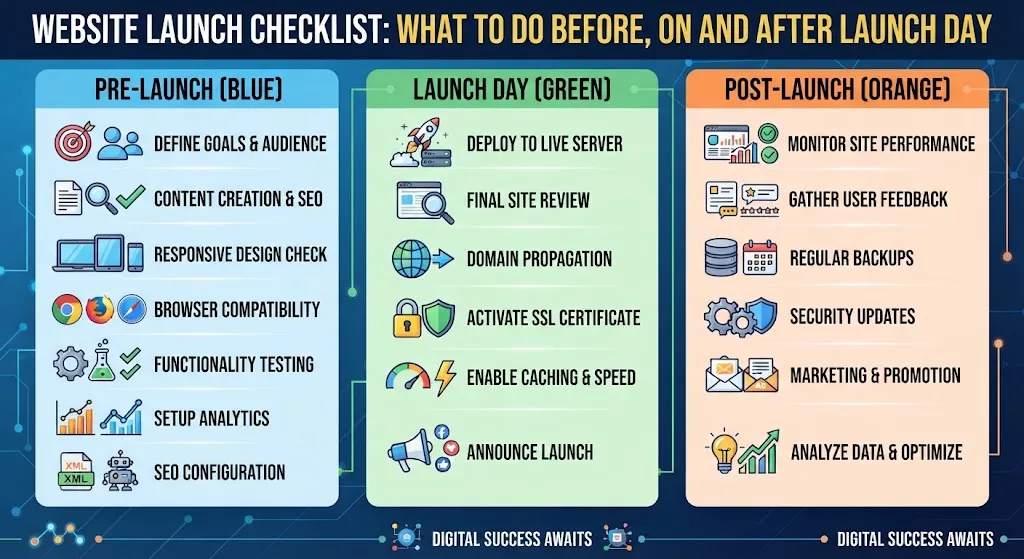
Quick Answer
A sound launch plan has four parts: finished content and legal pages, forms and tracking tested end to end, indexing switched on with a sitemap submitted, and backups plus speed and mobile checks done. Do the heavy work before launch, verify on launch day, then monitor closely for 30 days.
Most launch problems are not dramatic. A contact form that sends mail nowhere, a "discourage search engines" box nobody unticked, a staging link still sitting in the menu. This website launch checklist is built to catch exactly those, in the order you will actually do them.
I have grouped it into three phases: before launch, launch day, and the first 30 days. You can print it, paste it into a task tool, or hand it to whoever is building your site.
Your website launch checklist at a glance
This table is the whole plan on one screen. The sections below explain the items that trip people up.
| Task | Why it matters | When |
|---|---|---|
| Final content and image review | Placeholder text and broken images destroy trust fast | Pre-launch |
| Legal pages (privacy, terms, cookie notice if needed) | Required in many places and expected by visitors | Pre-launch |
| Test every form and email | Lost enquiries are lost revenue | Pre-launch |
| Analytics and conversion tracking | You cannot improve what you never measured | Pre-launch |
| Mobile and browser check | Most visitors will not be on your laptop | Pre-launch |
| Speed test on key pages | Slow pages lose visitors before they read a word | Pre-launch |
| Backup system running | A restore point beats a rebuild | Pre-launch |
| Redirects from old URLs | Protects links and rankings on a relaunch | Launch day |
| Indexing setting switched to allow search engines | Left blocked, your site stays invisible in search | Launch day |
| Search Console verified, sitemap submitted | Gives you indexing and error reports | Launch day |
| SSL and the www/non-www version checked | Avoids security warnings and duplicate versions | Launch day |
| Re-test forms on the live domain | Staging and live often behave differently | Launch day |
| Review indexing and crawl errors | Catches blocked or broken pages early | Days 1-7 |
| Fix broken links and 404s | Dead ends hurt visitors and crawling | Days 1-14 |
| Re-check speed with real traffic | Lab tests miss live problems | Days 7-30 |
| Confirm backups restore and updates are scheduled | An untested backup is only a hope | Days 7-30 |
Phase 1: Before launch
Content and design
Read every page out loud once. Remove lorem ipsum, "coming soon" blocks and any text that still describes a different business. Check that each page has one clear next step: call, book, buy or enquire.
Compress images before upload, and give meaningful images short alt text. Check that your logo, address, phone number and opening hours match everywhere they appear.
Legal pages
Most sites need at least a privacy policy, and shops usually need terms, shipping and returns pages. If you use analytics, advertising pixels or embedded video, you may also need a cookie notice with real consent controls. The rules differ by country and by what you collect, so this is a place to read your local requirements or ask a professional rather than copy a stranger's template blindly.
Forms, email and tracking
Submit every form yourself, from a phone and from a desktop. Confirm the message arrives, lands in the inbox rather than spam, and that the visitor sees a proper thank-you message.
Contact form mail is the most common silent failure on new WordPress sites, because many hosts do not send mail reliably from the default setup. A dedicated SMTP or transactional mail service usually fixes it.
Then install analytics and set up at least one conversion event, such as a form submission or a purchase. Test it by completing the action and confirming it appears in your reports.
Mobile, browsers and accessibility basics
Open the site on a real phone, not only in a resized desktop window. Tap every menu item and button. Check that text is readable without zooming and that nothing overlaps.
Do a quick keyboard pass too: can you reach the menu and the main button using the Tab key, and can you see where you are? It takes two minutes and catches problems that affect real people.
Speed
Test your homepage and one inner page. Google's web.dev guidance describes "good" Core Web Vitals as Largest Contentful Paint within 2.5 seconds, Interaction to Next Paint of 200 milliseconds or less, and Cumulative Layout Shift of 0.1 or less, measured at the 75th percentile of page loads. Use those as targets, not as pass-or-fail anxiety.
If you are well outside them, our guide on how to speed up your WordPress site walks through the fixes in a sensible order.
Security and backups
Before launch, change default usernames, use strong unique passwords, remove unused plugins and themes, and turn on two-factor login for admins. The full list lives in our security checklist.
On backups, WordPress developer documentation is clear that you need both the database and the files to fully restore a typical site. It suggests weekly backups for smaller sites and daily for high-activity ones, with copies stored in more than one place. Set that up now, before you need it.
Phase 2: Launch day
The indexing setting: off while building, on at launch
While a site is being built, it is sensible to tick "Discourage search engines from indexing this site" under Settings, then Reading. WordPress documentation explains that this adds a noindex,nofollow robots meta tag, and also notes that it only asks search engines to comply: it does not block access.
The trap is the second half. On launch day, untick it, save, then view the page source of your homepage and search for "noindex". If it is still there, something else is adding it, often an SEO plugin setting or a leftover staging configuration. Check again an hour later, and again the next day.
Search Console and your sitemap
Add your site to Google Search Console and verify ownership. Then submit your sitemap. Most SEO plugins create one for you, and the address is usually something like /sitemap.xml or /sitemap_index.xml, so open it in a browser first to confirm it loads.
Google is careful about what this does: submitting a sitemap is "merely a hint" and does not guarantee crawling. What you gain is the Sitemaps report, which shows when Googlebot read the file and any processing errors. For the rest of your on-page basics, see our basic SEO setup guide.
Redirects, SSL and domain versions
If this is a relaunch, map every old URL that has traffic or links to its closest new page with a 301 redirect. Skipping this is the fastest way to turn a redesign into a ranking drop. If you are planning that kind of project, the redesign guide covers the planning side.
Confirm the site loads over HTTPS with no mixed-content warnings, and that only one version is the "real" one: www or non-www should redirect to the other, not both load separately.
Final live tests
Repeat your form, checkout and tracking tests on the live domain. Clear your cache, load the site in a private window, and click through the main journey as a stranger would.
Phase 3: The first 30 days
Week 1
Watch Search Console's indexing and sitemap reports for errors. Check analytics to confirm data is flowing. Read your email for form submissions and check spam daily.
Weeks 2 to 4
Fix any broken links and 404s you find. Re-run your speed tests now that real content and traffic are in play. Do a test restore of a backup, even on a staging copy, so you know it works.
Turn on a regular update routine. WordPress supports auto-updates for plugins and themes, but its own documentation advises making sure you can roll back first. If you would rather not manage this yourself, read about what a good ongoing maintenance plan should include.
Do not expect rankings to settle in 30 days. Indexing can take time, and no checklist can promise a position. What you are building in this window is a clean, measurable base.
Get a second pair of eyes
If you want someone to run this website launch checklist against your site before it goes live, Muhammad Muheet offers a free initial audit. Packages include competitive pricing, flexible installments and 4 weeks of post-development support. Reach out through WhatsApp or book a free initial audit.